Stuart's Blog
  • Home
  • Galleries
    • Star Trek Online
  • Liquid
    • Download
    • Screenshots
    • Changelog
    • Help
  • About
KEEP IN TOUCH
« Arrange windows side-by-side in Windows 7
» Xfire shortcut keys

How to disable real-time protection in Microsoft Security Essentials

Sep30
2009
Leave a Comment Written by Stuart Clark

Microsoft has just released their new free anti-virus product called Microsoft Security Essentials, it has been in public beta for a while now but just been released to the masses, I’ve only just installed it on the whole it seems as good as an anti-virus program from the makers of your operating system would be. One feature that I couldn’t easily find was how to disable the real-time protection on the fly which would be handy for when I want to play games without any interference from the real-time scanning. Currently the only way to do this is listed below:

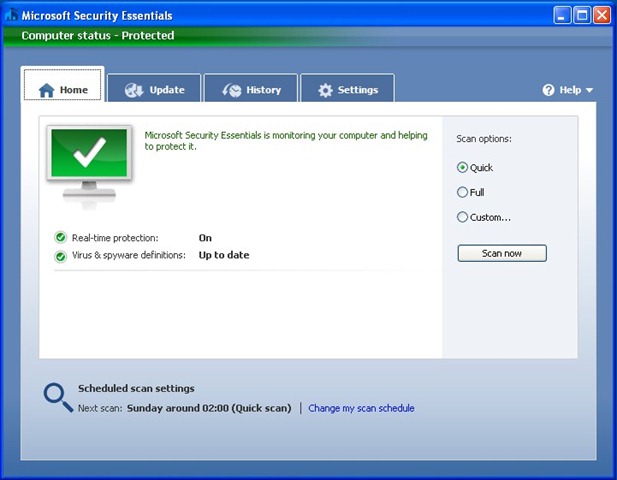
  1. Open the main program window by either double clicking on the taskbar icon or running the Microsoft Security Essentials shortcut on your desktop.

    Microsoft Security Essentials - Home

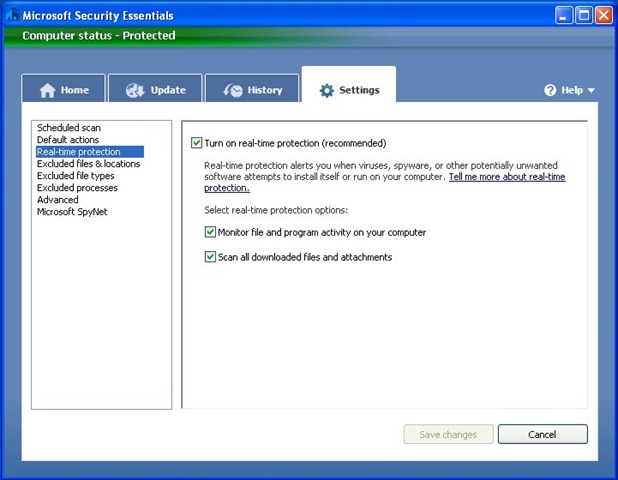
  2. Click on the Settings tab and then click Real-time protection in the box on the left, to disable the real-time protection untick the tick box in the panel on the right and then click the Save changes button. It has now been disabled.

    Microsoft Security Essentials - Settings

  3. Just in case you weren’t sure this was a bad thing the Home tab has now been changed to warn you that you are at risk, to turn real-time protection back on it is as simple as clicking the giant red Turn on button once you are ready.

    Microsoft Security Essentials - At Risk

Related posts:

  1. Default Microsoft Outlook PST location
Posted in Windows - Tagged Microsoft Security Essentials
« Arrange windows side-by-side in Windows 7
» Xfire shortcut keys

No Comments Yet

Leave a Reply Cancel reply

Your email address will not be published. Required fields are marked *

*

*

You may use these HTML tags and attributes: <a href="" title=""> <abbr title=""> <acronym title=""> <b> <blockquote cite=""> <cite> <code> <del datetime=""> <em> <i> <q cite=""> <strike> <strong>

 
Download Liquid

Popular Posts

  • Assassin’s Creed save game location
  • Fix Windows Update error code 80240025
  • .NET charting with ZedGraph
  • How to disable real-time protection in Microsoft Security Essentials
  • Grand Theft Auto IV command line options
  • Map a network drive in Windows 7
  • Nokia 5230 codes
  • Xfire shortcut keys
  • Assassin’s Creed and Xfire
  • How to load the web page instead of the RSS feed summary in Thunderbird 3

Archives

  • July 2011
  • October 2010
  • September 2010
  • July 2010
  • January 2010
  • December 2009
  • November 2009
  • October 2009
  • September 2009
  • May 2009
  • March 2009
  • February 2009
  • January 2009
  • December 2008
  • October 2008

EvoLve theme by Theme4Press  •  Powered by WordPress Stuart's Blog